2026년 4월 26일
Language / Python[Python] 5. 문자열
『데이터를 다루며 배우는 파이썬』을 참고하였고, 학교에서 수업을 들으며 필기한 내용으로 보충하였다.
목차
[1] 연속된 문자들
[2] len() 함수로 문자열의 길이 얻기
[3] 반복문과 문자열
[4] 문자열 슬라이스
[5] 문자열 불변
[6] 루프와 카운트
[7] 문자열 관련 연산자, 함수
[8] 문자열 함수
[9] 문자열 파싱
[10] 포맷 연산자
[1] 연속된 문자들
문자열(string): 여러 문자가 순서대로 나열돼 있는 것
문자열의 예: 'word', 'We are the Champion', '안녕하세요'
대괄호 연산자를 써서 문자열 내의 개별 문자에 접근할 수 있다.
fruit = 'banana'
print(fruit)
print(fruit[0])
print(fruit[2])
print(fruit[4])
banana
b
n
n문자열 인덱스는 다음과 같다.
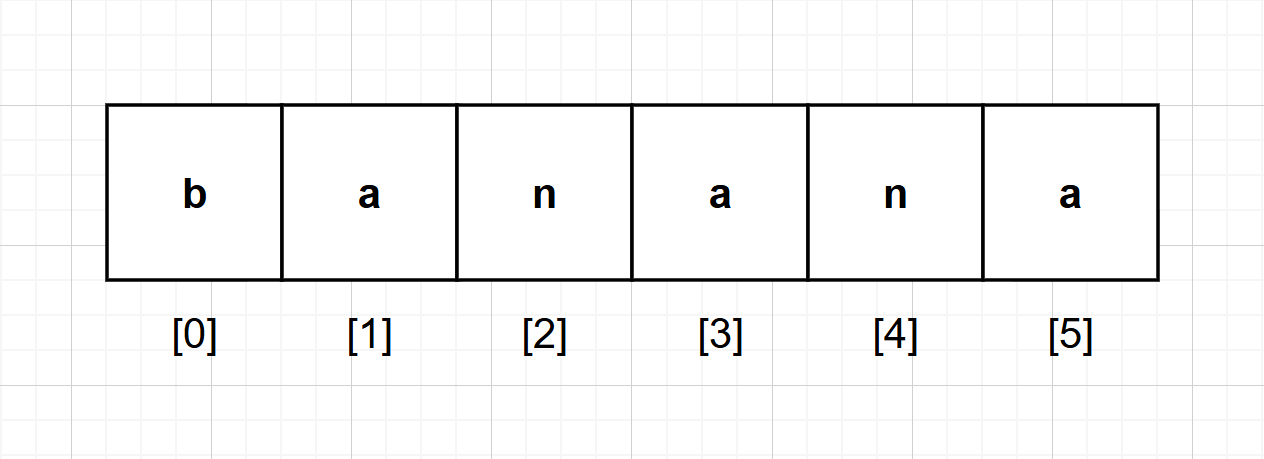
다음과 같이 프로그램을 작성하면, 문자열의 문자를 순서대로 모두 출력할 수 있다.
fruit = 'banana'
print(fruit)
for i in range(6):
    print(fruit[i])
k = 0
while k<6:
    print(fruit[k])
    k = k + 1
banana
b
a
n
a
n
a
b
a
n
a
n
a[2] len() 함수로 문자열의 길이 얻기
문자열의 길이를 어렵게 알아내는 방법
fruit = 'banana'
count = 0
for c in fruit:
    count = count + 1
print(count)6문자열의 길이를 쉽게 알아내는 방법
fruit = 'banana'
print(len(fruit))6len은 문자열 내의 문자 개수를 반환하는 내장 함수다.
len()을 사용해서 문자열 내의 마지막 문자를 구하려고 할 때, 아래처럼 쓰는 경우가 있다.
>>> length = len(fruit)
>>> last = fruit[length]
Traceback (most recent call last):
File "<pyshell#2>", line 1, in <module>
last = fruit[length]
IndexError: string index out of rangeIndexError가 발생한 이유는 'banana'에는 인덱스 6에 해당하는 문자가 없기 때문이다. 문자열의 인덱스는 0부터 시작하므로, 6개의 문자로 된 문자열이라면 유효한 인덱스 범위는 0부터 5다. 따라서 마지막 문자를 얻으려면 length에서 1을 빼야 한다.
다음 문제를 풀어보자.
words = 'It allows embedding Sage computations into any webpage'- 문자열의 문자 갯수는?
- 위 문자열에서 12번째 문자는?
- 맨 마지막 문자를 출력하시오. (단, len() 함수를 이용할 것)
words = 'It allows embedding Sage computations into any webpage'
print(len(words)) # 1
print(words[12-1]) # 2
print(words[len(words)-1])  # 3
54
m
e[3] 반복문과 문자열
다음의 문자열이 있다.
words = 'It allows embedding Sage computations into any webpage'while문을 이용하여, 한 문자씩 words의 모든 문자를 출력해보자.
words = 'It allows embedding Sage computations into any webpage'
n = 0
while n < len(words):
    print(words[n], end='')
    n = n + 1
It allows embedding Sage computations into any webpage이와 같은 순회 방법으로 for 루프를 이용하는 방법도 있다.
words = 'It allows embedding Sage computations into any webpage'
for c in words:
    print(c, end='')
It allows embedding Sage computations into any webpage문자열을 위와 같이 순회하게 되면, 이런 분석도 가능해진다. 가령 위 words의 문자 'e'의 개수는?
words = 'It allows embedding Sage computations into any webpage'
count = 0
for c in words:
    if c == 'e':
        count = count + 1
print(count)
한 문자씩 추출될 때마다, 'e'와 같은지의 여부를 확인한 후, 참이라면 카운트를 하고 거짓이라면 카운트를 넘긴다.
다음 문제를 풀어보자.
words = 'It allows embedding Sage Computations into any Webpage'- 위
words에서 while문을 이용하여 문자를 뒤에서부터 앞으로 한 문자씩 차례로 출력하라. - 위
words에서 for문과 if문을 이용하고 , 다음을 참조하여 대문자만을 출력한다.
참조: 문자가 'A'와 'Z' 사이('A' 이상이고, 'Z' 이하)이면 대문자이다.
words = 'It allows embedding Sage Computations into any Webpage'
c = len(words)
while c >= 1:
    c = c - 1
    print(words[c], end='')
print()
for i in words:
    if i >= 'A' and i <= 'Z':
        print(i, end= ' ')
egapbeW yna otni snoitatupmoC egaS gniddebme swolla tI
I S C W [4] 문자열 슬라이스
문자열의 특정 부분을 슬라이스(slice) 라고 한다. 문자열 내의 슬라이스를 지정하는 일은 인덱스로 문자를 지정하는 것과 유사하다.
s = 'Monty Python'
print(s[0:5])
print(s[6:12])
Monty
Python슬라이스 연산자는 문자열의 m번째 문자부터 n번째 문자에 해당하는 부분을 반환한다. 주의할 점은 m번째 문자는 포함하되, n번째 문자는 제외한다는 점이다.
만약, 콜론(:) 앞의 인덱스를 생략하면 슬라이스는 문자열 처음부터 시작하며, 두 번째 인덱스를 생략하면 문자열 끝을 범위로 한다.
첫 번째 인덱스가 두 번째 인덱스와 같거나 더 크면, 비어 있는 문자열(empty string)을 반환한다.
일반적인 슬라이싱
s[m:n]: m번 문자부터 n번 문자 전까지 슬라이싱
s[:n]: 처음 문자부터 n번 문자 전까지 슬라이싱
s[m:]: m번 문자부터 끝 문자까지 슬라이싱
s[:]: 모든 문자
s = 'Monty Python'
print(s[6:8])
print(s[:5])
print(s[6:])
print(s[:])Py
Monty
Python
Monty Python[5] 문자열 불변
s = 'Load'
print(s)
print(s[2])
Load
a문자열 내의 어떤 문자를 바꿔야 할 때 대입문 왼쪽에 인덱스를 써서 아래처럼 쓰고 싶을 수 있다.
s = 'Load'
s[2] = 'r'
print(s)
Traceback (most recent call last):
File "C:\Users\judit\Downloads\test.py", line 2, in <module>
s[2] = 'r'
TypeError: 'str' object does not support item assignment오류 원인은 '이미 생성한 문자열은 변경할 수 없다'는 문자열 불변(immutable) 의 특징 때문이다. 따라서 가장 좋은 방법은 원본을 변경한 새로운 문자열을 만드는 것이다.
s = 'Load'
new_s = s[:2] + 'r' + s[3]
print(s)
print(new_s)
Load
Lords의 슬라이스에 다른 문자를 연결해 새 문자열을 만들었다. 원본 문자열인 s는 변하지 않았다.
[6] 루프와 카운트
아래 코드는 문자열 내에 'a'가 몇 개 들어있는지 구한다.
word = 'banana'
count = 0
for letter in word:
    if letter == 'a':
        count = count + 1
print(count)
[7] 문자열 관련 연산자, 함수
in 연산자
s = 'banana'
k = 'a' in s
print(k)
k = 'p' in s
print(k)
b = 'nan' in s
print(b)
if 'an' in s:
    print('있다')
True
False
True
있다문자열 비교 연산자 (==, >, <)
알파벳 순서에 따른 문자열의 크기 비교
s = 'banana'
print(s == 'banana')
if s == 'banana':
    print('바나나 맞음')
else :
    print('바나나 아님')
print( s > 'apple' )
print( s < 'apple')
print( 'Hi' > 'Hii' )
True
바나나 맞음
True
False
False문자 및 문자열 함수
ASCII 코드표
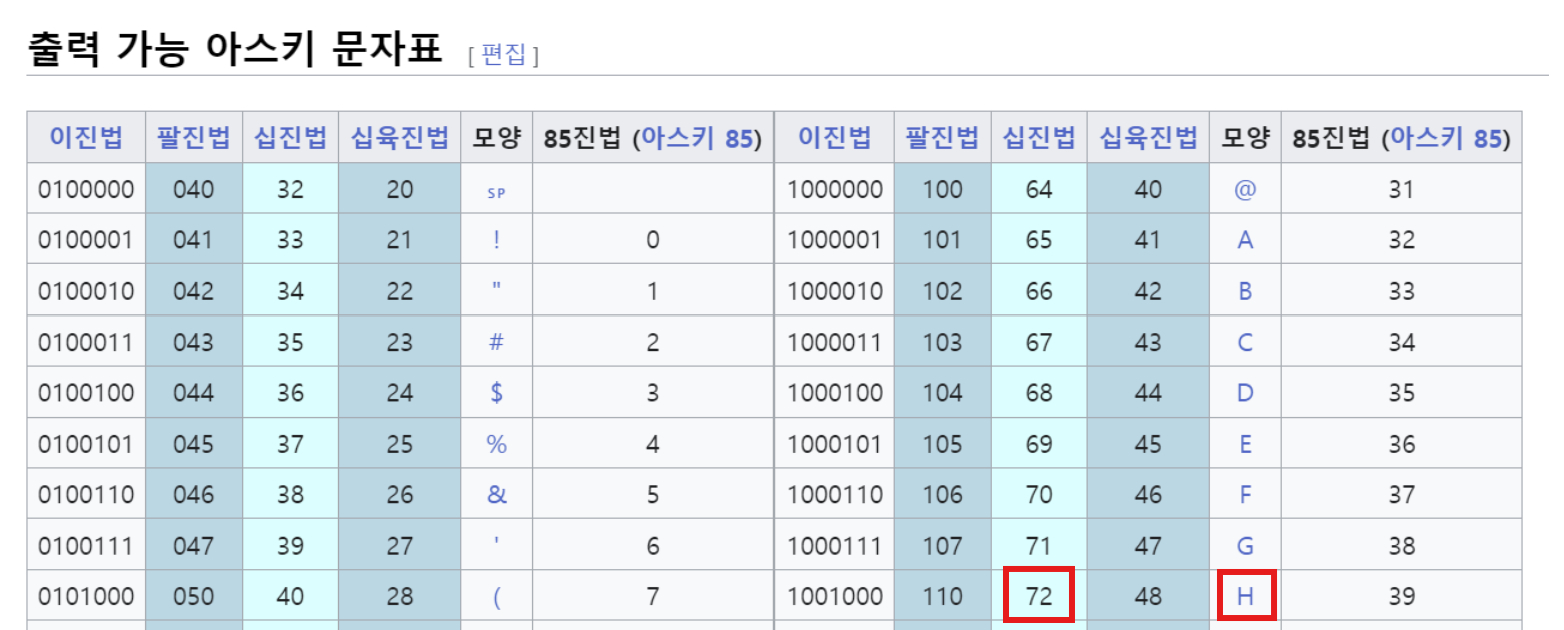 출처: https://velog.io/@yonghyeun/ASCII-UTF-8-UTF-16-%EC%9D%B4-%EB%AD%94%EB%8D%B0
예) 문자 'H' → ord('H'), chr(72)
print(ord('H'))
print(chr(72))
x='H'
print('문자 '+x+'의 소문자 =>')
print(chr(ord('H')+ord('a')-ord('A')))
72
H
문자 H의 소문자 =>
h[8] 문자열 함수
문자열은 파이썬 객체 중 하나다. 문자열 객체에는 멤버변수(필드)와 멤버함수(메소드)가 있다.
s = 'Hello World'
print('0         1')
print('012345678901234')
print(s)
print(s.upper()) # 대문자로
print(s.lower()) # 소문자로
print(s.find('Wo')) # 'Wo'의 문자열은 몇번에?
print(s.index('W')) # 'W' 문자는 몇번 인덱스에?
print(s.startswith('He')) # 'He'로 시작?
print(s.startswith('W')) # 'W'로 시작?
print(s.lower().startswith('h')) # 소문자로 변환해서, 'h'로 시작하는지
t='     temp       '
print('123456789123456789')
print(t)
print(t.lstrip()) # 왼쪽 공백을 잘라내라
print(t.rstrip()) #  오른쪽 공백을 잘라내라
print(t.strip()) # 좌우 공백을 잘라내라
print(t)
0 1
012345678901234
Hello World
HELLO WORLD
hello world
6
6
True
False
True
123456789123456789
temp
temp
temp
temp
temp [9] 문자열 파싱
다음의 문자열이 있다.
From avengers.robert@eulji.ac.kr Sat Jan 5 09:14:16 2020- 'From' 문자열부터 시작되는가?
- 위 문자열에서 URL 'eulji.ac.kr'만 뽑아내고 싶다.
data = '  From avengers.robert@eulji.ac.kr Sat Jan 5 09:14:16 2020 '
tdata = data.strip()
print(tdata.startswith('From'))
atpos = tdata.find('@')
print(atpos)
sppos = tdata.find(' ', atpos)
print(sppos)
host = tdata[atpos+1:sppos]
print(host)
True
20
32
eulji.ac.kr다음 문제를 풀어보자.
str = 'X-DSPAM-Confidence:0.8475'위 str 변수의 문자열에서 콜론(:) 이후의 문자열을 가져와 이를 실수로 바꾸어라.
str = 'X-DSPAM-Confidence:0.8475'
a = str.find(':')
b = str[a+1:]
c = float(b)
print(c)
print(type(c))
0.8475
<class 'float'>[10] 포맷 연산자
포맷(format) 연산자 %는 변수에 저장된 데이터로 문자열의 특정 부분을 대체한다. 주의할 점은 %가 정수에 사용될 때는 나머지 연산자로 사용된다는 것이다. % 연산자 왼쪽에 문자열(포맷코드)이 있을 때만 포맷 연산자로 사용된다.
camels = 42
t = '%d' % camels
print(t)
print(type(t))
42
<class 'str'> '%d' % camels
포맷코드 변수포맷변수 %d는 변수(camels)의 값을 불러와 d(decimal, 10진수)로 대치하라는 뜻이다. 결과의 t는 '42'가 문자열로 저장된다.
여러 데이터를 문자열에 삽입할 수 있다.
data = 'That tree grew %g %s in %d years' % (15.2, 'cm' , 3 )
print(data)
That tree grew 15.2 cm in 3 years- 튜플 내의 원소 수와 문자열 내의 포맷 코드 개수가 동일해야 한다.
- 여기서 튜플이란 괄호 안에 쉼표로 구분하여 값을 표현하는 데이터형을 말한다.
댓글
댓글을 불러오는 중...